ERP solutions have modules designed to meet various organizational requirements. Some qualities become very useful when used in IT operations.
- Asset and Infrastructure Management
Networks, servers, software licenses, cloud subscriptions, and employee devices are all managed by IT departments. ERP solutions offer these assets lifecycle management and organized tracking. The efficient allocation and monitoring of resources are guaranteed by effective ERP in IT.
- Project Management Integration
IT teams usually manage several projects at once. Scheduling, task distribution, resource planning, and progress tracking are all supported by ERP modules. This guarantees steady production and the meeting of deadlines.
- Financial and Budget Control
For IT departments, budget control is essential. ERP systems combine operational costs, purchase records, and financial data. Businesses can clearly see their IT expenditures and prospects for cost reduction by deploying ERP in IT.
- Procurement and Vendor Management
Hardware, software, and service providers are essential to IT operations. Workflows related to contract tracking, vendor communication, and procurement are streamlined by ERP systems. Delays are decreased, and accountability is enhanced.
Benefits of Implementing ERP in IT
There are quantifiable benefits to IT teams implementing ERP systems.
- Improved Operational Efficiency
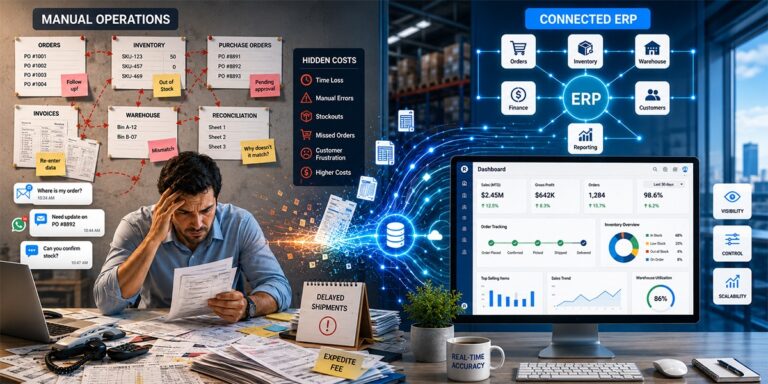
Repetitive manual chores are reduced by automation. Instantaneous insights into ongoing activities are provided by centralized dashboards. IT teams may concentrate on innovation rather than administrative tasks thanks to ERP in IT.
Using various tools frequently results in data inconsistencies. ERP systems reduce errors and duplication by maintaining a single source of truth.
- Better Collaboration Across Departments
Finance, HR, and operations departments frequently work along with IT departments. Cross-functional coordination is improved through ERP integration, which guarantees smooth data sharing.
- Scalable Infrastructure Support
IT needs increase as firms do. By adjusting to growing data volumes and operational complexity, ERP systems facilitate scalability.
Careful planning is necessary for successful implementation. Before choosing an ERP platform, organizations need to assess their current IT procedures.
Important implementation actions consist of:
- Examine existing processes and areas of discomfort.
- Establish specific goals.
- Choose appropriate ERP software.
- Adapt modules to IT specifications.
- Provide training to staff members.
- Track results after installation.
ERP in IT provides long-term value with proper planning.
Challenges in ERP Implementation
Despite the fact that ERP systems have many advantages, companies may have difficulties when implementing them.
- Opposition to change
- Complexity of data movement
- Combining legacy systems
- Qualifications for training
- Costs associated with initial implementation
Strategic planning and good leadership are necessary to overcome these obstacles. Risk is frequently decreased by a phased implementation strategy.
ERP and IT Service Management
Service delivery and incident resolution fall under the purview of IT departments. Ticket monitoring, response times, and service-level agreement compliance are all enhanced when ERP is integrated with service management solutions.
Businesses can easily monitor performance indicators and consolidate service requests by implementing ERP in IT.
Data Security and Compliance
IT operations prioritize security. ERP systems offer audit trails, user rights, and restricted access. These characteristics improve regulatory compliance and data protection tactics.
Encryption protocols and multi-factor authentication are features of modern ERP in IT solutions that improve cybersecurity.
Integration with Emerging Technologies
The landscape of technology is changing quickly. These days, cloud platforms, AI, and sophisticated analytics tools are all integrated into ERP systems.
ERP in the cloud provides flexibility, remote access, and lower infrastructure costs. AI-powered insights improve resource planning and predictive analysis even more.
Measuring ROI of ERP in IT
Return on investment evaluation is crucial. Companies can assess the efficacy of ERP by:
- Lower operating expenses
- Higher rates of project completion
- A rise in output
- Improved use of resources
- Increased precision in reporting
Monitoring performance indicators shows how ERP in IT aids in the expansion of businesses.
Future Trends in ERP for IT Departments
ERP technology is still developing. Among the new trends are:
- ERP systems that are cloud-native
- Analytics driven by AI
- Tools for predictive maintenance
- Automated monitoring of compliance
- Dashboards for real-time performance
Businesses can utilize the advantages of ERP in IT by staying current with these changes.
Building a Future-Ready IT Infrastructure
Prioritizing structured systems is essential for organizations pursuing digital transformation. Scalable expansion is facilitated by ERP platforms.
ERP in IT promotes innovation and operational resilience by coordinating technology infrastructure with business objectives. In highly competitive marketplaces, it allows businesses to maintain agility while managing complexity.
Conclusion
Modern firms must have effective IT management. Centralized process management becomes essential as businesses grow and digital technologies become increasingly integrated. ERP systems offer the organization, automation, and transparency needed for efficient IT operations management.
ERP in IT completely changes how firms run, from asset monitoring and financial administration to service management and data security. Stronger strategic alignment, lower costs, and more efficiency can be attained by businesses through appropriate implementation, training, and ongoing optimization.
ERP investment in IT systems is a strategic choice that promotes long-term sustainability and competitive advantage, not just a technical advancement.
—————————————————————————————————————————
1. What is ERP in information technology?
An integrated software program called ERP (Enterprise Resource Planning) assists companies in managing key functions like supply chain management, finance, inventories, and human resources.
By consolidating data onto a single platform, it enhances departmental decision-making in real time, accuracy, and efficiency.
2. What is ERP with an example?
A software program called ERP (Enterprise Resource Planning) unifies key corporate operations including finance, inventory, and human resources onto a single platform.
SAP, for instance, offers ERP systems that assist companies in tracking data, managing operations, and increasing overall productivity.
3. What is ERP and its types?
Businesses can handle essential company processes including supply chain management, operations management, finance, and human resources with the help of an integrated software application called ERP (Enterprise Resource Planning).
The three main types of ERP-on-premise, cloud-based, and hybrid-have different deployment and infrastructure management approaches.
4. What are the 7 stages of implementation of ERP?
Planning, requirement analysis, system design, development, testing, deployment, and post-implementation support are the seven stages of ERP implementation that are commonly included.
Every phase guarantees that the system is appropriately set up, integrated, and optimized for seamless corporate operations and sustained success.
5. Is Excel an ERP tool?
Microsoft Excel is a spreadsheet program used for data analysis, computations, and reporting; it is not an ERP solution.
Excel does not offer integrated, real-time departmental administration of key business processes, in contrast to ERP systems.
6. What are ERP tools?
ERP tools are software programs designed to manage and integrate supply chain operations, finance, inventory, and human resources on a single platform.
Examples of programs that assist businesses in increasing productivity and data accuracy are SAP, Oracle, and Microsoft (Dynamics 365).
7. What are the five 5 ERP modules?
Finance and accounting, human resources, supply chain management, inventory management, and customer relationship management (CRM) are the five typical ERP modules.
Within an ERP system, several modules cooperate to consolidate business data and expedite activities.









 Get Started